
Replacing an industrial RJ45 plug in the field
Use the WEIPU RJ45F6II to check the mating port, cable diameter, shielding and seal before replacing an industrial Ethernet plug.
Need help selecting? Send photos of the model, nameplate and installation; quantity may be unknown.
A damaged plug on a machine cabinet
A maintenance team needs to replace the cable-end connector on an Ethernet lead. The cabinet socket is intact. The old outer collar has cracked, the cable is marked Cat 6 and its round jacket measures 6.6 mm. Can the team order a WEIPU RJ45F6II? The diameter fits size II. The decision now turns on the mating socket, the required screen connection and the modular plug that will go inside the housing.
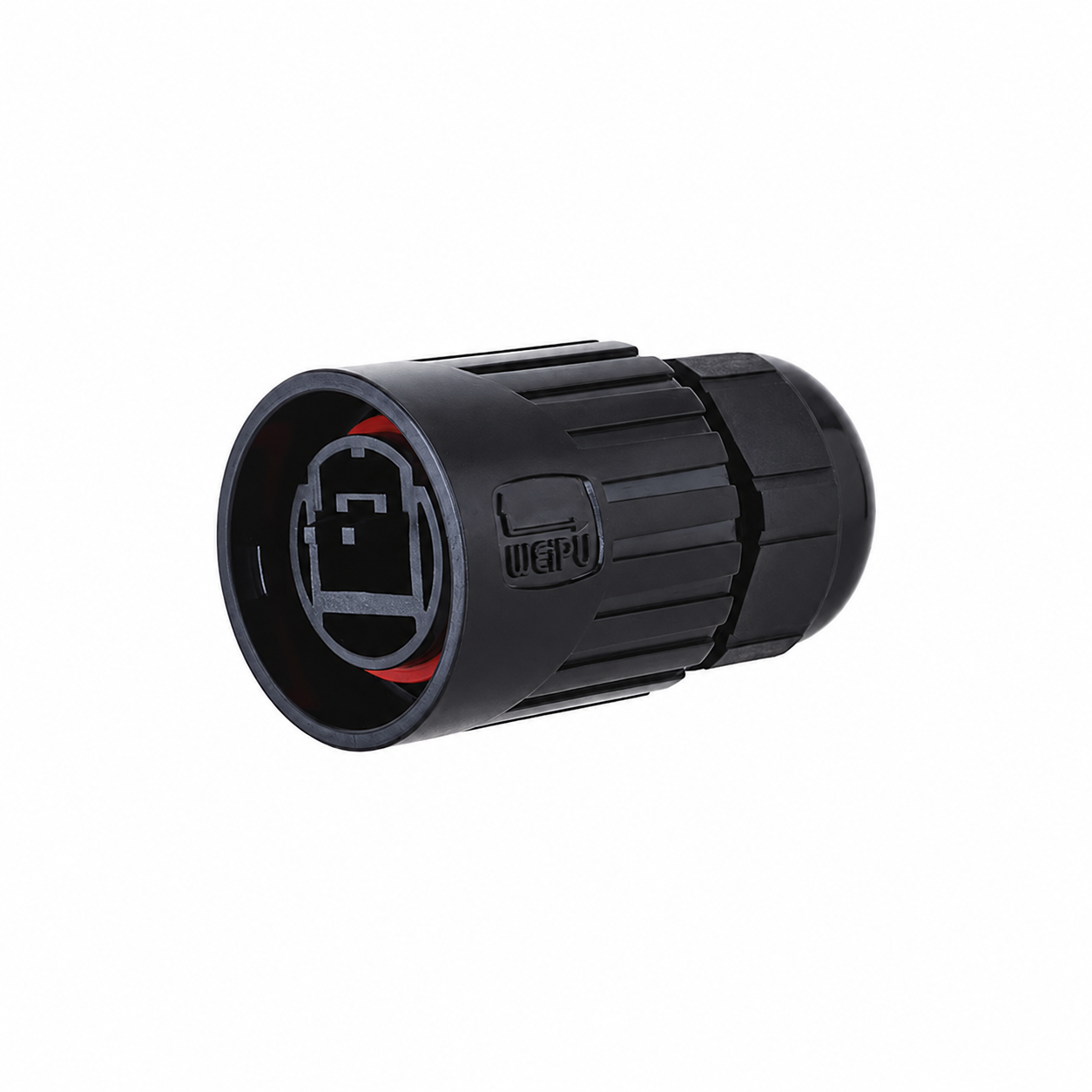
Identify both halves before choosing the plug
Photograph the socket face, its part marking and the old cable end from the side. A standard RJ45 interface identifies the data connection. The outer housing has its own keying, depth and locking geometry. Compare these with the WEIPU RJ45F mating drawing. WEIPU shows the RJ45F6 cable plug and RJ45F71 receptacle in this family. If the existing socket is unmarked, obtain its drawing or confirm the pairing before ordering. WEIPU mating diagram and drawings
Measure the jacket at the cable entry
Use calipers on a clean, round section of the intact outer jacket where the gland will grip. Measure across two directions without flattening the cable. Record the readings in millimetres. Cuts, a flattened section or an overmoulded boot change what the gland actually bears on.
WEIPU lists size I for 5–6 mm and size II for 6–7 mm. The 6.6 mm example falls within size II. A 5.5 mm replacement cable changes that choice even if both cables carry the same Cat 6 marking. At the shared 6.0 mm boundary, provide the cable maker's diameter tolerance and ask which seal WEIPU specifies for that cable. WEIPU size table
| Measured jacket OD | Initial choice | Remaining check |
|---|---|---|
| 5.5 mm | Size I: listed range 5–6 mm | Cable tolerance, sound round jacket and correct seal |
| 6.6 mm | Size II: listed range 6–7 mm | Mate, plug contents and shielding requirement |
| 6.0 mm | Shared nominal boundary | Ask the manufacturer to choose the seal using actual tolerance |
| Outside the listed ranges | Neither size established | Request another entry option; do not force the gland |
Check the conductors, plug and shield requirement
Read the jacket legend and equipment specification. Record the category, cable screen construction, solid or stranded conductors and conductor size. Confirm the modular plug accepts those conductors and their insulation diameters. For an existing terminated lead, first check whether the plug and boot can pass through the housing in the specified assembly sequence. Our RJ45F6II product record flags the modular plug as an item to confirm in the quotation.
The manufacturer's marketplace listing identifies the RJ45F6II as unshielded. If the machine requires a continuous shield through the cabinet connection, pause here and specify a documented screened assembly. If the machine calls for an unscreened link, continue once the mate and plug contents are confirmed. Check any Power over Ethernet requirement against the complete assembly as a separate item. WEIPU exact-part listing
Inspect the two seals and test the repaired link
Follow the manufacturer's assembly instructions with the port isolated as required by the machine procedure. Inspect the mating seal for dirt, cuts or displacement. Check the rear gland closes on sound jacket and the lead can bend without pulling sideways on the entry. Engage the bayonet fully. WEIPU specifies IP67 when mated. If the port is routinely left unplugged, specify the protection required in that state and the matching rated cap. WEIPU protection condition
Check the wire map and pair assignment against the original design. For a link with a contractual category requirement, save a passing test at the specified link or channel limit. Record the negotiated speed and check the port error counters under normal machine operation. Keep the result with the replacement part number so the next technician can reproduce the repair.
What to send for a replacement quotation
| Purchase field | Send with the enquiry | Confirm in the quotation |
|---|---|---|
| Mating connection | Socket code and front/side photographs | Matching outer housing and locking geometry |
| Cable entry | Measured OD, tolerance and jacket condition | Correct size and seal |
| Termination | Solid/stranded construction and conductor size | Compatible modular plug and assembly sequence |
| Electrical requirements | Category, shield path and any PoE requirement | Complete assembly suitability |
| Protection | Connected and disconnected exposure | Mated rating and appropriate cap if required |
| Supply scope | Housing only, plug included or completed lead | Exact contents and agreed acceptance test |
Send the mating-port marking and photo, the old plug marking, jacket OD and tolerance, cable legend, required shield path and required protection both connected and disconnected. State whether you need the housing only, a compatible modular plug, or a completed, tested lead. In this example, RJ45F6II is a candidate for the 6.6 mm jacket once the mating and electrical checks pass. Read the technical analysis of shielding, category and sealing
Need help selecting? Send photos of the model, nameplate and installation; quantity may be unknown.
Related reading
Industrial RJ45 shielding, Cat 6 and IP67 explained
See how shield continuity, Cat 5e or Cat 6 transmission performance and the two housing seals affect an industrial Ethernet link, using WEIPU RJ45F6II.
Read article →